Give Your LLM a Wiki, Cut Input Tokens ~50%
I did not publish anything from last one year.
Reason is LLMs. Because when LLMs can explain everything very fast, writing step-by-step tutorial is waste of time.
But this one is different. It is not a tutorial. It is about making LLMs remember our project code. So next time it will not start from zero.
It starts with very boring problem in software: Documentation. In every team I worked in, everyone has same tension: documentation is not updated.
Reason is simple. Updating docs is very boring work.
We engineers are lazy to write docs. And we are also very bad at it. Maybe you will write documentation one time, and then code will change. And you forget to update the documentation.
After six months, doc is totally wrong.
But new joiner will trust it because he doesn’t know anything. Nobody ever bothered to fix this. We just ignore it and continue our work.
Main project knowledge (like payment flow logic, or why one function is there) is only inside a senior engineer’s head or some old Slack messages which are difficult to find.
But think about LLMs. They won’t get bored. They can check fifteen files and update the details, and again do same thing tomorrow without complaining. The boring work which developers like us hate, LLMs will do happily daily.
This will completely change how we do documentation.
I understood this properly after reading one gist on GitHub. It is written by Andrej Karpathy. He calls it the LLM Wiki.
His point is simple. Right now “the LLM is rediscovering knowledge from scratch on every question. There’s no accumulation.” Every answer is lost. Next time it starts from zero again. His fix is not a better search.
It is a wiki which the LLM builds one time and keeps updated.
He even connects it to Vannevar Bush’s 1945 Memex. That idea failed first time because humans could not do the maintenance. Now the LLM will do that part.
He says the full division of work in one line: “You’re in charge of sourcing, exploration, and asking the right questions. The LLM does all the grunt work, the summarizing, cross-referencing, filing, and bookkeeping.”
Next question is, what should these docs look like? Nothing fancy. Any format will work.
I am using plain markdown files. Small YAML frontmatter on top. And links between pages. That is it. One markdown file renders as a Hugo website which a human can read. The same file is plain text which an LLM can read.
No special tool needed here. If you already have some format you like, just use it. Human gets a map of the codebase which is correct. LLM gets the context ready, so it will not grep the whole repo again.
I built a small demo where every page in the codebase gets its own documentation file.
I call it a page wiki: page-wiki.md.
Here page means one bounded area of a codebase, not only a browser page. A page wiki can be:
- A UI route
- An API endpoint
- A background job
- A service
- A data pipeline
- Any related group of files which you understand and change together
How does an LLM read our codebase?
You ask the LLM to change one page. It opens five files. Reads everything. Then it understands how they are connected. After that only it starts the work.
Tomorrow you ask one more change in the same page. It opens the same five files. Reads everything again. From zero. Every time it is learning the same thing again.
For a small script, no issue. But in a project where you are working for months, you are paying for this again and again. More tokens, more waiting, and your context window is full before the real work starts.
What is missing? An index.
Think about a dictionary. When we search for one word in a dictionary, we won’t read it from first page to last page. The dictionary is sorted alphabetically.
We jump directly to the first letter of the word, then move a few pages, and reach the word in seconds.
That alphabetical order is an index.
It is the only reason a book with 100,000 words is still usable.
Now imagine the same dictionary in random order. Same words, same meanings. No alphabetical order. To find one word, you have to start from page one. Read page after page. Until you find that word.
Same book. But without the index it is almost useless. We are stuck doing a slow, one-by-one page search.
Finding code in a new repo is exactly this random-order dictionary.
A codebase is a book with thousands of “words” (functions, components, endpoints) spread across hundreds of “pages,” the files. When an LLM tries to change the code, it has no knowledge about the codebase. Same like the dictionary without index.
So it starts scanning our codebase file by file, using the words from our prompt (grep search).
Opens whatever files match. Reads them to check if they are correct. If not, greps again and opens more. Every miss is one more page turned. One more file read. One more turn. One more few thousand tokens.
And if the code you want to change is not using the same words you typed, the search will simply miss it. Maybe the file is using some other name. Maybe the call is happening indirectly, at runtime. Now the model is lost. It starts guessing.
This is exactly how a human mind also works.
Put a fresh engineer into a large codebase. Tell them to change the book-list search. They also can’t jump straight to the correct file. They open files. Read. Follow imports. Guess. Check. Go back. The human version of grep.
It is slow. And it is slow for the same reason. No index yet.
Now take one senior engineer working in that same codebase from two years. Same task. He will not search at all.
He already knows it. “That is the BookListComponent. Search is a computed signal on the in-memory list. And one thing, filtering is happening only on client-side.”
He opens the file directly. And he already knows where to change the code. He is not more intelligent than the fresher. He is just having the index ready in his head.
With an LLM, every session it is the fresher. It has no memory of your codebase. However smart it is at reasoning, it wakes up every time having never seen your repo. And builds the map from zero. Same as you, if your memory reset every morning.
A page wiki is that senior engineer’s mental index. Written down and kept fresh. So a new teammate, or the model, who never saw this code will also get the same shortcut or index on day one.
Now no searching. The LLM opens one page. That page tells which files to touch and what to be careful about.
The whole idea in one line
The pattern is one sentence:
Understand a page once, write down the important points in a
page-wiki.md, link that file to the source using the git blob hash, then read the page next time instead of reading the full source again. When the code changes, the hash will not match and the page becomes stale. Only then you read the source again.
That is it. Two things make it work. These are the parts people usually skip:
- Each page is a short summary which a human (or a model) wrote on purpose. Not a raw dump of the files.
- Each page is anchored to the exact source it describes. So it can tell you when it is out of date, instead of misleading you silently.
A wiki which cannot tell you it is old is dangerous. Better to keep nothing.
The git-hash anchor is what turns “some notes I wrote one time” into something you can actually trust. Every session, and for the full team.
The setup
The setup has three layers:
app source        (many files — the ground truth)
   ↑ re-read ONLY when the page is STALE
page-wiki.md      (one short file per page, anchored to source by git hash)      ← reused every time
   ↑ resolved via
wiki-index        (which page is this request even about?)
- Source is the real truth. It is big and spread across many files. Reading all of it is what costs you.
page-wiki.mdis one small file for one area. It has the overview, the component or request flow, the data flow, the important files, and the gotchas which the model will otherwise find out again. Each page also stores the git blob hash of every source file it covers.wiki-indexanswers one more question. For a vague request like “fix the book list search”, which page should I open? It is a small lookup file. So you need not know the folder structure to reach the correct page.
Why anchor to the git blob hash?
A codebase is not like a set of documents.
With documents, you decide when to update. You give the agent new sources. It reads them again. Maybe you run some check to catch the wrong or old points. That works, because you are controlling when the sources change.
But code will not wait for you. It is changing daily, from every commit and every teammate. And nobody will inform you.
So the freshness check must be automatic and cheap. And nobody should be able to fake it. That is what makes this whole thing safe.
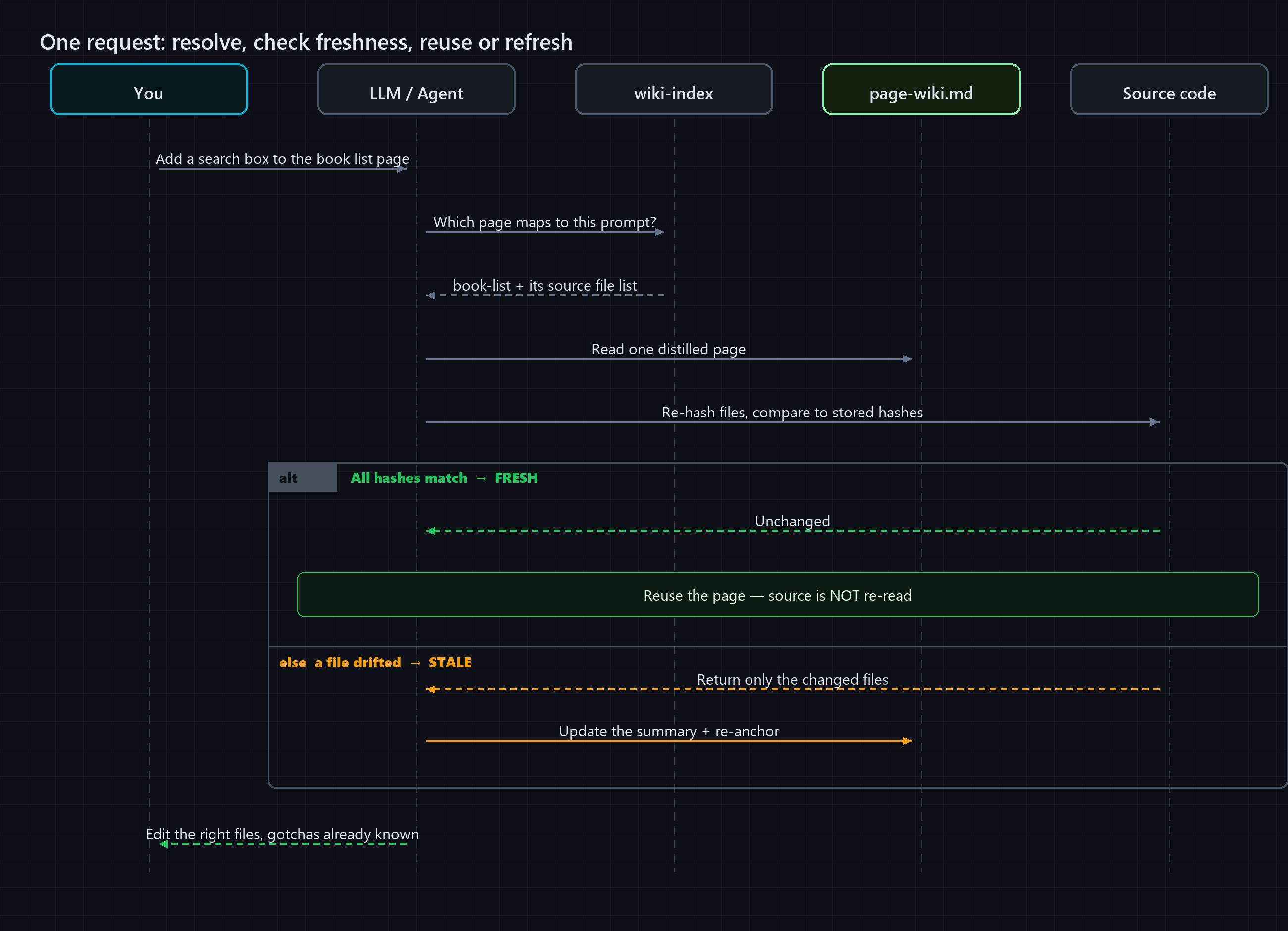
A page-wiki.md stores the git blob hash of every source file it describes. So the check is simple and exact. Hash the current files again and compare:
- All hashes match → the page is FRESH. Reuse it. Do not re-read the source.
- A hash differs → that file DRIFTED → the page is STALE. Re-read only the changed files, update the summary, re-anchor.
Orange: re-reads source every time. Teal: reads wiki, edits, then updates the wiki and re-anchors the git hash.
You can also keep a timestamp in each file (“last updated on…”). That is okay to know when somebody touched it last.
But timestamp will not tell you if the code actually changed. It only tells you the clock moved.
For code, that difference matters.
A hash will either match the file on disk or it will not. No “I think it is still correct” guessing.
So the wiki fails loudly. It tells you the second it goes old. That is exactly the moment when a normal doc will quietly give you a wrong answer.
One catch is there, and people skip it. You have to build the index first. Understanding one page and writing its page-wiki.md is real work.
But this work you do only one time. And the LLM will do it, because this is exactly the boring type of work. After that every request gets the benefit. Build one time, reuse many times.
So when you ask something, the full flow looks like this:
The demo
Talking about token saving is easy. You can run the demo and check the numbers yourself:
github.com/arungudelli/token-llm-wiki
Both parts are deployed on GitHub Pages. No setup needed to see it working:
- Live Angular bookstore, the small codebase which the wiki describes.
- Live wiki, one
page-wiki.mdper page, rendered as a Hugo site. Open the book-list entry to see what the LLM reads instead of the source.
It is three pieces:
| Folder | Role |
|---|---|
app/ | A small Angular bookstore (list → detail → cart). This is the “codebase” which the assistant will otherwise read file by file. |
wiki/ | A Hugo site: one page-wiki.md per page plus a wiki-index resolver. This is the wiki layer. |
tools/ | facts.mjs, a small CLI with no dependencies. It runs the full loop: resolve → check freshness → compare → demo. |
Here is a real page-wiki.md from the demo.
Nothing fancy. Plain markdown, small YAML frontmatter, and links to related pages. Same file renders as a web page for humans, and reads as plain text for the LLM.
Only extra thing is the source-hashes block. That is the anchor:
---
title: "Book List — Page Wiki"
node-id: book-list
summary: "Bookstore catalog: responsive grid of books with search + genre filter, and an add-to-cart button per card."
resolve-terms: [catalog, browse books, book grid, genre filter, search books, add to cart]
routes: /books
last-anchored: 2026-09-16
source-hashes:
  - file: app/src/app/pages/book-list/book-list.component.ts
    hash: f033198f679e96d10779a231c35eb111d5aac46a
  - file: app/src/app/pages/book-list/book-list.component.html
    hash: 8c68e988d6a7160c146ca4e896855875a0d5f79f
  # …one hash per source file the page describes
---

## Overview
Standalone component `BookListComponent` (route `/books`, the app's default). Renders the
whole catalog as a card grid with a live search box + genre `<select>`, plus a per-card
**Add to cart**.

## Gotchas
- Filtering is client-side over the full in-memory list — fine for the demo, would need
  server paging for a real catalog.
- `Add to cart` mutates shared `CartService` state; the header/cart count updates
  reactively everywhere.
That “Gotchas” section is the main point. A model which reads this already knows the hidden things. Otherwise it has to find them again by reading every file.
What does it actually save?
The CLI (node tools/facts.mjs compare-all) compares the cost in two ways for each page. Reading all the source files again, versus reading only the page-wiki.md:
| Page | Source files | Re-read source | Reuse page-wiki.md | Saved |
|---|---|---|---|---|
book-list | 5 | ~1,277 tok | ~593 tok | ~54% |
book-detail | 6 | ~1,414 tok | ~680 tok | ~52% |
cart-checkout | 6 | ~1,027 tok | ~590 tok | ~43% |
| Total | 17 | ~3,718 tok | ~1,863 tok | ~50% |
Almost half the tokens. Per page, every time. And this is a small app where files are already tiny.
On a real page with one service, two-three models, a template and its styles, the gap will be much bigger. The page-wiki.md size stays same, but the source it replaces keeps growing.
So take these demo numbers as the minimum. This is a very small repo. In a big codebase where one page pulls thousands of tokens, one summary page will save a lot more.
One thing to be clear. This saving is on input tokens. The context which you send into the model.
You are not reading and analysing the source again for every request. So the prompt you send becomes small. That is the win, and it is on the input side.
Output tokens, what the model writes back, will not change. The same edit still has to be written.
But in a coding session the input is always much bigger than the output. The code you send in is far bigger than the answer coming out. So reducing the input is where the money is.
One honest note on the numbers. The demo counts tokens using the common ~4 characters per token rule. It is not an exact tokenizer.
That is done on purpose. It is enough to show the relative saving. If you want exact numbers, put tiktoken behind the same function.
The point is, you stop paying full price to learn the same page again. The exact decimal does not matter.
The freshness check is also cheap:
$ node tools/facts.mjs check-all

book-list:     FRESH (5/5 source hashes match)
book-detail:   FRESH (6/6 source hashes match)
cart-checkout: FRESH (6/6 source hashes match)
The full loop, end to end:
$ node tools/facts.mjs demo "book list"

resolve "book list":  [2] book-list  Book List — wiki/content/pages/book-list/page-wiki.md
book-list: FRESH (5/5 source hashes match)
=> REUSE page-wiki.md — read ~593 tokens instead of ~1277 (saved ~54%). Source NOT re-read.
Resolve the page. Check it is fresh. Reuse it. Just to understand the page, the source is never opened.
What happens across a whole team?
That ~50% is per page, per visit, for one person only.
But the wiki is not personal. It sits inside the repo, in version control, next to the code. So everybody shares it.
One engineer understands the book-list page one time. That page-wiki.md goes into the repo. After that every teammate, and all their own future sessions, start from that page. Nobody finds it out again.
Now do the team maths. Take thirty engineers. Each one opening a few AI sessions daily. All working on the same few hundred pages.
Without a shared wiki, every session reads the same code from zero. Same page is figured out again thousands of times in a week.
With one wiki, this happens one time per page. Everybody else reuses it. So the saving is for the full team, not only your sessions.
And you need not document everything in the beginning. Pages get built as you work.
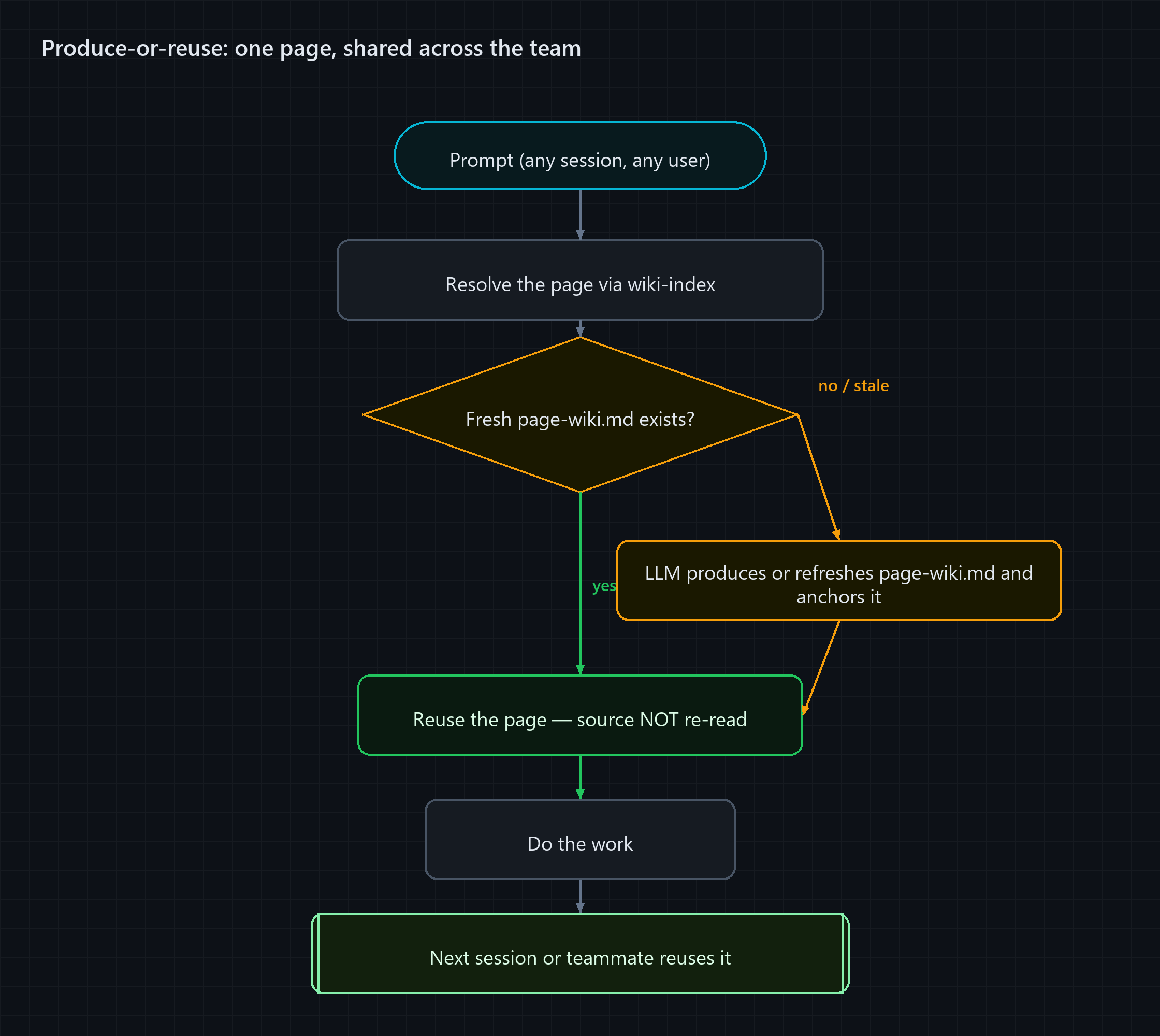
Make it a pipeline. Every task starts by resolving the page. Then one question. Is a fresh wiki page already there?
- Yes → reuse it. You did not pay anything to create it. You are just using the team’s work.
- No, or it is stale → the LLM writes (or updates) the
page-wiki.mdthen and there, anchors it, and then starts the work.
Both ways you get your answer. Only difference is, the second one leaves a fresh page behind. So the next session, and the next teammate, will find it ready.
Yes, you have to build the index first. But it happens slowly, page by page. Whoever touches a page first pays for it. Everybody after that gets it free.
The wiki is a living thing which you maintain, same like the code. Only difference is, most of the maintenance is done by the one worker who does not mind this work.
When is this worth it?
Let me be honest here. This is not free.
It helps when:
- The codebase is big and mostly stable. You come back to the same areas often, and they are not changing every hour.
- You work in many sessions. The cost of the wiki is spread over every future visit. More you come back, more it saves.
- The hidden knowledge (gotchas, data flow, how files are connected) is costly to find out again and again.
It is not worth it when:
- The code is changing constantly. You will spend all your time re-anchoring stale pages.
- The codebase is small, so reading it is anyway cheap.
- The work is one-time throwaway which you will never touch again.
One more real cost is there. A short summary will always miss some details. If a page shows one field and skips the exact type of another field, an assistant which trusts the page will also miss it.
Fix is to be careful about what goes inside the summary. Keep the shapes and the differences which matter. And check the small details from source when your change depends on them.
A page wiki is a starting point. It is not a replacement for opening the file when it really matters.
Few rough edges, from actually using it.
These are not theory. Each one hit me while building the demo and using this on my own code. Better to know them before you depend on it:
- The hash checks bytes, not meaning. One formatting change or one renamed local variable will make a page STALE, even when the summary is still fully correct. First time a formatting-only commit turned my page red, I learnt the lesson. So treat STALE as a signal to check the page once again. Most of the time one quick check tells you the summary is still correct, and you just re-anchor.
- Reuse will not happen by itself. The anchor only tells you the page can be trusted. It will not force you to use it. In the beginning I was still opening the source “just to confirm” and wasting the tokens anyway. That is why a command pipeline matters. The tooling should decide when to trust the page and when to go back to source.
- Editing will still read the file you are changing. This one surprised me first. I thought the page will fully replace the source. It will not. The big saving is on understanding: the data flow, how files are connected, the gotchas which you will otherwise find out again. You will still open the one file you are patching. That is okay, because understanding the page again is the costly part, and that is what the wiki saves.
None of these break the idea. These are the next things to improve (an anchor which understands meaning, a resolver which checks itself). And this is why I am calling it a starting pattern.
LLM writes it, but you own the correctness
This whole thing is only as good as the knowledge inside it.
A correct page saves tokens and gets the change right. A slightly wrong page saves tokens and quietly sends you in the wrong direction.
So correctness is the main thing. And this is where the human is needed.
An LLM is very good at the first draft of a page. It reads everything and writes down what it saw. Fast, and without complaining.
But the best page-wiki.md is the one which a human reviewed. Human will catch what the model missed. And human knows the gotcha which is not written anywhere in the code.
So LLM does the boring bulk work. Human does the thinking part.
And this review should not happen only one time.
You are in the middle of a session. You see the page missed something. Some wrong point, some behaviour, some gotcha which the model never wrote. You should be able to just say it, and that correction should go back into the page.
That is the second pipeline worth building. Correct-in-place, along with produce-or-reuse. The moment a human sees a gap, the fix goes into the wiki.
So the next session, and the next teammate, get the better version. Slowly the wiki stays fresh and also becomes smarter. Every human correction stays there permanently, and everybody after that gets it free.
What is still missing?
The demo CLI does every step manually. Resolve, check, compare, re-anchor. That is done on purpose, so you can see and measure each part of the loop.
But running it manually will not scale.
All the steps are fixed. Resolve the page. Check freshness against the source hashes. Update the summary if something changed. Re-anchor. This is a pipeline. And a pipeline should be in a command, not in a prompt.
Best way is one shared command which the full team runs in the same way:
- A Claude Code command or skill which wraps the full loop. When you start work on a page, it resolves the page, checks freshness, and gives you a ready wiki. Or creates one if it is not there.
- A post-commit hook which finds which source files changed, finds the affected page wikis, and re-anchors them automatically. Nobody has to remember it.
- A CI step which runs
check-allon every PR and flags any page wiki which went out of sync with the diff.
When somebody adds a new file, the pipeline sees this file has no hash in any wiki. It adds the file to the correct page and re-anchors. So the wiki grows along with the codebase, instead of going behind.
This is what changes it from a habit of two-three careful engineers into something the full team can depend on. The CLI in the demo is the core logic. The command pipeline is the wrapper which makes it automatic.
Take the idea and change it for your stack. Build the wrapper one time, then the wiki will take care of itself.
Try it yourself
Clone it, run the loop, and see the numbers:
git clone https://github.com/arungudelli/token-llm-wiki.git
cd token-llm-wiki
node tools/facts.mjs compare-all
node tools/facts.mjs demo "book list"
Then change any source file in app/, run check-all again, and see that page turn STALE. The anchor catches the change immediately.
If you try this on your own project, tell me how much you saved.