Your LLM Keeps Re-reading the Same Code. Give It a Wiki.
I haven’t published in about a year.
Not because I ran out of things to say, LLMs did. When a model can explain any framework in seconds, writing another step-by-step tutorial feels pointless.
But this idea is different.
It’s not a trick to teach an LLM. It’s a way to make it remember what it already learned about your codebase, so every new session doesn’t start from zero.
And it starts with the most boring problem in software.
Every team I’ve worked on has carried the same quiet guilt: the documentation is out of date.
Not because anyone is lazy, but because keeping docs current is boring, repetitive, thankless work.
You write the page once, feel good, and then the code moves on without it.
Six months later that doc is a liability. Confidently wrong, quietly rotting, and trusted by the new person who didn’t know any better.
We never really solved this. We just learned to live with it.
The knowledge that actually runs a product (the meaning of a metric, the join between two tables, the one gotcha in the payment flow, the reason a function exists at all) lives in senior engineers’ heads and in Slack threads nobody can find again.
So why am I excited? Because for the first time, we have a kind of worker that is genuinely good at the boring part.
LLMs don’t get bored. They don’t mind updating a cross-reference.
They’ll read fifteen files carefully, write down what they found, and do it again tomorrow without sighing once.
The exact chore that makes humans abandon their wikis is the thing an LLM does happily, all day long.
That single fact inverts the economics of documentation.
One gist crystallized this for me.
It was a piece by Andrej Karpathy on what he calls the LLM Wiki.
His observation is that right now “the LLM is rediscovering knowledge from scratch on every question. There’s no accumulation.” Each answer evaporates; the next one starts from zero.
His fix isn’t fancier search. It’s a wiki the LLM compiles once and keeps current, a persistent, compounding artifact.
He even traces the lineage to Vannevar Bush’s 1945 Memex, an idea that failed the first time because humans couldn’t bear the upkeep. Now the LLM bears it.
He puts the whole division of labor in one line: “You’re in charge of sourcing, exploration, and asking the right questions. The LLM does all the grunt work, the summarizing, cross-referencing, filing, and bookkeeping.”
Which raises the obvious question: what should these notes actually be?
The answer turned out to be delightfully boring. The format can be almost anything. Mine is just plain markdown files with a little YAML frontmatter and links between pages.
That’s the whole trick. A markdown file renders as a Hugo website a human can read, and the exact same file is plain text an LLM can parse. One artifact, no translation layer.
You don’t need a special spec or a knowledge-base product for this. If you already have a format you like, use it. The point is the pattern, not the paperwork.
And that’s what clicks into place. A wiki written and maintained by an LLM isn’t a doc for the machine or a doc for the human. It’s the same file serving both.
One artifact, two beneficiaries: the human gets a living map of the codebase that actually stays current, and the LLM gets a context primer so it walks in already oriented instead of grepping around to rebuild the map from scratch.
So I did the obvious thing.
I pointed all of this at the place I spend all day, a codebase, and built a small, runnable version of it. I call each per-page file a page wiki: page-wiki.md.
Here, page means a bounded area of a codebase, not only a browser page. A page wiki could describe:
- A UI route
- An API endpoint
- A background job
- A service
- A data pipeline
- Any related group of files that makes sense to understand and change together
The rest of this post is the story of it: how simple the file can be, the one thing you have to add to make it safe on code that changes under you, a demo you can clone, and the actual token numbers.
🔁 First, the pain — on a codebase
Here’s what “no accumulation” feels like when the sources are source files.
You ask an assistant to change a page. It opens five files, reads them top to bottom, works out how they fit together, and then does the work.
The next session you ask for a related change to the same page, and it opens the same five files and reads them all over again, from scratch.
Every session, it rediscovers what it already knew. On a throwaway script, that’s free.
On a codebase you’ll live in for months, it’s a tax on every single request, paid in tokens, in latency, and in the context window you’d rather spend on the actual problem.
🗺️ Why this is hard — and why the fix is obvious once you see it
Start with a dictionary.
When you look up a word in a dictionary, you don’t read it cover to cover. You know it’s sorted alphabetically, so you thumb to roughly the right letter, then the right few pages, and land on the word in seconds.
That alphabetical order is an index. It’s the entire reason a book with 100,000 words in it is still usable.
Now imagine someone hands you a dictionary with all the same words and all the same definitions, but in random order. No alphabetical structure, no thumb tabs.
To find a single word, you’d have no choice but to start on page one and scan, page after page after page, until you happened to hit it.
Same words, same book; but without the index it’s almost useless. You’re stuck doing a brute-force, linear search.
Finding code in an unfamiliar repository is exactly that random-order dictionary.
A codebase is a book with thousands of “words” (functions, components, endpoints) scattered across hundreds of “pages,” the files. When an AI assistant drops into it with no prior knowledge, it holds the shuffled dictionary.
So it does the only thing it can: it scans. It greps for words from your prompt, opens whatever files match, reads them to check whether they’re the right ones, and if not, greps again and opens more.
Every miss is another page turned: another file read, another turn, another few thousand tokens.
And when the thing you’re changing doesn’t literally contain the words you typed (a synonym, an indirection, a call wired up dynamically) the search sails right past it and the model wanders.
Here’s the part I find fascinating: this is exactly how a human mind works, too.
Drop a brand-new engineer into a large codebase and ask them to change the book-list search. They can’t teleport to the right file either.
They open things, read, follow imports, form a guess, check it, backtrack. The human version of grep. It’s slow, and it’s slow for the very same reason: no index yet.
Now watch the senior engineer who has lived in that codebase for two years do the same task. They don’t search at all.
They already know: “that’s the BookListComponent, the search is a computed signal over the in-memory list, and careful, the filtering is client-side.” They go straight to the file and straight to the gotcha.
The difference between the newcomer and the expert isn’t raw intelligence. It’s that the expert has built an index in their head.
And here’s the catch with an LLM: every session, it’s the newcomer. It has no persistent memory of your codebase.
However good it is at reasoning, it wakes up each time having never seen your repo, and rebuilds the map from scratch, the same way you would if your memory reset every morning.
A page wiki is that senior engineer’s mental index, written down and kept fresh, so a model (or a new teammate) who has never seen the code gets the expert’s shortcut on the very first try.
It turns the shuffled dictionary back into an alphabetical one.
With that index in place, the assistant does what you’d do with a properly sorted dictionary: one lookup, straight to the entry. The prompt resolves to a page, the page names the exact files, and its distilled knowledge rides along for free.
🧠 The core idea
The pattern is one sentence:
Understand a page once, write down the distilled, reusable truth as a
page-wiki.md, anchor that file to the source by git blob hash, then reuse the page instead of re-reading the source every time. When the source changes, the anchor goes stale, and only then do you re-read.
That’s it. Two things make it work, and they’re the parts people usually skip:
- Each page is a distilled summary a human (or a model) wrote on purpose, not a raw dump of the files.
- Each page is anchored to the exact source it describes, so it can tell you when it has gone out of date instead of misleading you silently.
A wiki that can’t tell you it’s stale isn’t an asset. It’s a liability. The git-hash anchor is what turns “notes I wrote once” into durable knowledge you can trust session after session, and hand to someone else.
🏗️ Three tiers
Concretely, the pattern has three layers:
app source        (many files — the ground truth)
   ↑ re-read ONLY when the page is STALE
page-wiki.md      (one distilled file per page, anchored to source by git hash)   ← reused every time
   ↑ resolved via
wiki-index        (which page is this request even about?)
- Source is the truth. It’s big, it’s scattered across many files, and reading all of it is what costs you.
page-wiki.mdis one small file per bounded codebase area. It carries the overview, the component or request-flow map, the data flow, the key files, and, crucially, the gotchas a model would otherwise have to re-derive. Each page records the git blob hash of every source file it summarizes.wiki-indexanswers a different question: given a fuzzy request like “fix the book list search”, which page do I load? It’s a lightweight resolver so you don’t have to know the file layout to find the right page.
🔗 Why anchor to the git blob hash?
This is my one real addition to Karpathy’s pattern, and it exists because a codebase behaves differently from a pile of documents.
In the original LLM Wiki, freshness is mostly a human-driven event. You hand the agent new sources, it re-ingests, a periodic lint pass hunts for contradictions and stale claims. That works when you control when the sources change.
Source code doesn’t wait for you. It changes constantly, silently, from every commit and every teammate. So the freshness check has to be automatic, cheap, and impossible to fudge. That’s the part that makes the whole thing safe.
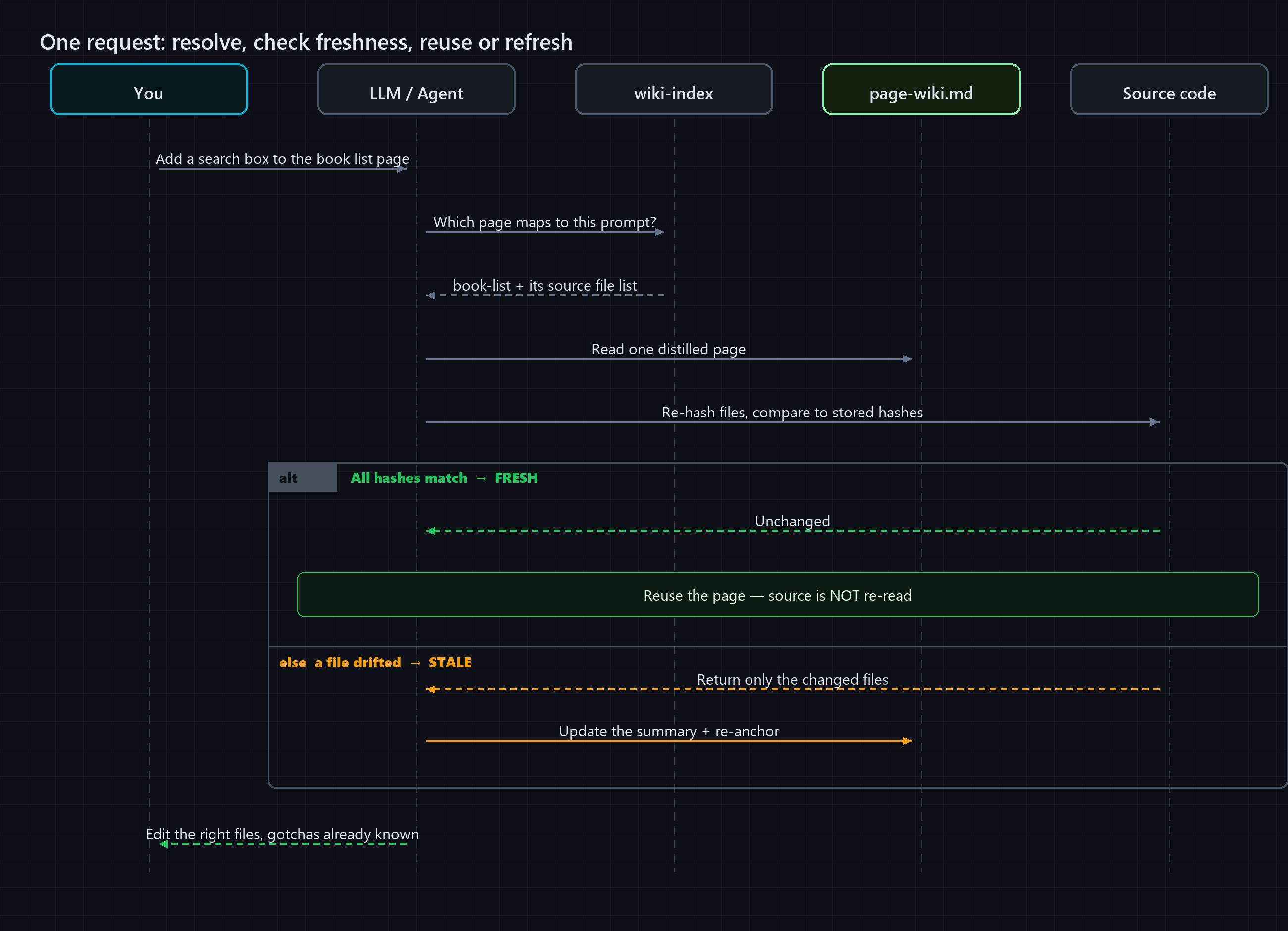
A page-wiki.md stores the git blob hash of each source file it describes. Checking freshness is then trivial and deterministic. You re-hash the current source files and compare:
- All hashes match → the page is FRESH. Reuse it. Do not re-read the source.
- A hash differs → that file DRIFTED → the page is STALE. Re-read only the changed files, update the summary, re-anchor.
Orange: re-reads source every time. Teal: reads wiki, edits, then updates the wiki and re-anchors the git hash.
You could just timestamp each file (“last updated on…”) which is fine for “when did we last touch this.”
But a timestamp can’t tell you whether the bytes actually changed, only whether the clock moved.
On code, that’s the difference that matters.
A content hash either matches what’s on disk or it doesn’t. No “I think this is probably still right.”
That means the wiki degrades loudly. It tells you the moment it’s out of date, which is exactly when a naive copy would quietly feed you a wrong answer.
The catch, and this is the part people skip, is that you have to build the index first. Understanding a page and writing its page-wiki.md is real work.
But it’s work you do once (and the LLM does it, since it’s exactly the boring kind), and every future request cashes in on it. Build once, reuse many times.
At query time, the full loop looks like this:
🎮 A demo you can actually run
Talking about token savings is easy. I built a small demo so you can run the loop and measure it yourself:
👉 github.com/arungudelli/token-llm-wiki
Both pieces are deployed to GitHub Pages, no setup needed to see the pattern in action:
- Live Angular bookstore, the toy codebase the wiki describes.
- Live wiki, one
page-wiki.mdper page, rendered as a Hugo site. Open the book-list entry to see exactly what an LLM reads instead of the source.
It’s three pieces:
| Folder | Role |
|---|---|
app/ | A toy Angular bookstore (list → detail → cart). This is the “codebase” an assistant would otherwise read file by file. |
wiki/ | A Hugo site: one page-wiki.md per page plus a wiki-index resolver. This is the wiki layer. |
tools/ | facts.mjs, a dependency-free CLI that runs the whole loop: resolve → check freshness → compare → demo. |
Here’s a real page-wiki.md from the demo.
Nothing exotic, just plain markdown, a little YAML frontmatter, and links to related pages: a file that renders as a web page for humans and reads as plain text for an LLM.
The only thing I added is the source-hashes block, which is the anchor:
---
title: "Book List — Page Wiki"
node-id: book-list
summary: "Bookstore catalog: responsive grid of books with search + genre filter, and an add-to-cart button per card."
resolve-terms: [catalog, browse books, book grid, genre filter, search books, add to cart]
routes: /books
last-anchored: 2026-09-16
source-hashes:
  - file: app/src/app/pages/book-list/book-list.component.ts
    hash: f033198f679e96d10779a231c35eb111d5aac46a
  - file: app/src/app/pages/book-list/book-list.component.html
    hash: 8c68e988d6a7160c146ca4e896855875a0d5f79f
  # …one hash per source file the page describes
---

## Overview
Standalone component `BookListComponent` (route `/books`, the app's default). Renders the
whole catalog as a card grid with a live search box + genre `<select>`, plus a per-card
**Add to cart**.

## Gotchas
- Filtering is client-side over the full in-memory list — fine for the demo, would need
  server paging for a real catalog.
- `Add to cart` mutates shared `CartService` state; the header/cart count updates
  reactively everywhere.
That “Gotchas” section is the whole point. A model that reads this already knows the non-obvious things it would otherwise have to reconstruct by reading every file.
📉 What it actually saves
The CLI (node tools/facts.mjs compare-all) compares the cost two ways for each page, re-reading all the source files, versus reading the single page-wiki.md:
| Page | Source files | Re-read source | Reuse page-wiki.md | Saved |
|---|---|---|---|---|
book-list | 5 | ~1,277 tok | ~593 tok | ~54% |
book-detail | 6 | ~1,414 tok | ~680 tok | ~52% |
cart-checkout | 6 | ~1,027 tok | ~590 tok | ~43% |
| Total | 17 | ~3,718 tok | ~1,863 tok | ~50% |
Roughly half the tokens, per page, per visit, on a toy app where the files are already small.
On a real page backed by a service, a couple of models, a template, and its styles, the gap is wider, because the page-wiki.md size stays flat while the source it replaces keeps growing.
So treat these demo numbers as a floor, not a ceiling. This is a tiny toy repo; on a large codebase where one page pulls in thousands of tokens of source, a one-page summary saves far more.
One important clarification: this is a saving on input tokens, the context you feed into the model.
You’re not re-reading and re-analysing the source on every request, so the prompt you send in shrinks. That’s the entire win, and it lives on the input side.
Output tokens, what the model writes back, don’t change; the same edit still has to be typed out.
But in a coding session the input dwarfs the output, because the code you pour in is far larger than the answer that comes out. Shrinking the input is exactly where the cost is.
A fair-play note on the numbers: the demo estimates tokens with the well-known ~4 characters per token heuristic, not an exact BPE tokenizer.
That’s deliberate. It’s more than good enough to show the relative saving, and you can swap in tiktoken behind the same function if you want exact figures.
The point isn’t the second decimal place; it’s that you stop paying full price to re-learn the same page.
And the freshness check is just as cheap:
$ node tools/facts.mjs check-all

book-list:     FRESH (5/5 source hashes match)
book-detail:   FRESH (6/6 source hashes match)
cart-checkout: FRESH (6/6 source hashes match)
The full loop, end to end, looks like this:
$ node tools/facts.mjs demo "book list"

resolve "book list":  [2] book-list  Book List — wiki/content/pages/book-list/page-wiki.md
book-list: FRESH (5/5 source hashes match)
=> REUSE page-wiki.md — read ~593 tokens instead of ~1277 (saved ~54%). Source NOT re-read.
Resolve the page, check it’s fresh, reuse the page. For a comprehension pass, the source never gets opened.
👥 Now multiply it by the whole team
That ~50% is per page, per visit, for one person.
Here’s where it gets interesting: the wiki isn’t personal. It lives in the repo, in version control, right next to the code. So it’s shared.
One engineer understands the book-list page once, and its page-wiki.md lands in the repo. From then on, every teammate (and every future session of their own) starts from that page instead of re-deriving it.
Now do the large-team math. Picture thirty engineers, each opening a handful of AI sessions a day, all working over the same few hundred pages.
Without a shared wiki, every one of those sessions re-reads the same code from scratch: the same page rediscovered thousands of times a week.
With one, that discovery happens once per page, and everyone else reuses it. The saving doesn’t just amortize across your sessions; it amortizes across the whole team’s.
And you don’t have to document everything up front. The pages get built as you go.
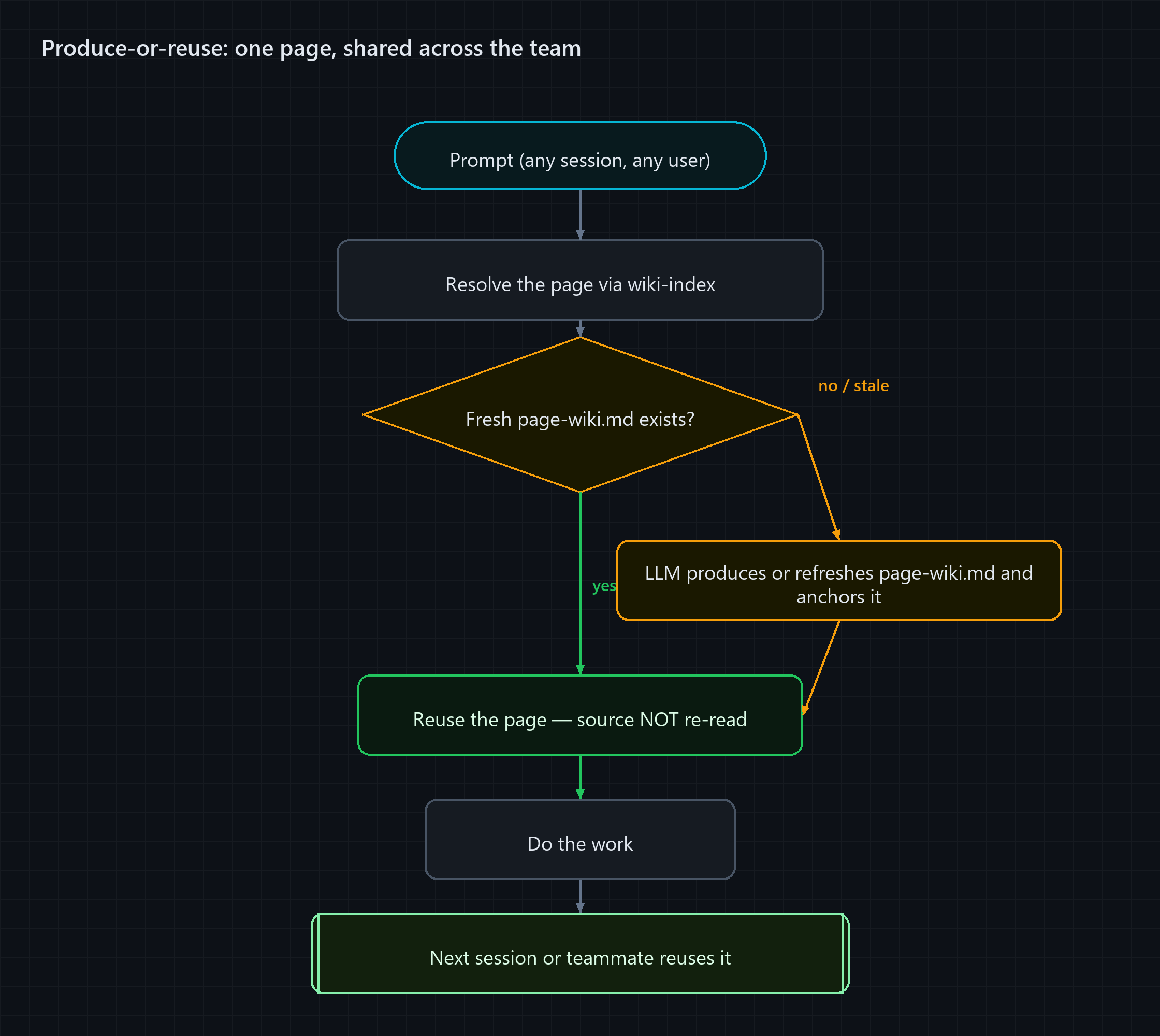
The trick is to make it a pipeline. Every task starts by resolving the page, then asks a single question: does a fresh wiki page already exist?
- Yes → reuse it. You paid nothing to produce it; you just ride the shared knowledge.
- No, or it’s stale → the LLM produces (or refreshes) the
page-wiki.mdright there, anchors it, and then does the work.
Either way you get your answer. The difference is that the second path leaves a fresh page behind, so the next session, and the next teammate, find it ready.
Yes, you have to build the index first, but “first” is lazy and incremental. The first person to touch a page pays to produce it; everyone after them rides free.
The wiki is a living artifact you maintain, the same way you maintain the code. It just happens to be maintained mostly by the one worker that doesn’t mind the upkeep.
⚖️ When this pays off — and when it doesn’t
I want to be honest about the trade-offs, because this isn’t free.
It pays off when:
- The codebase is large and relatively stable. You revisit the same areas often, and they don’t churn every hour.
- You work across many sessions. The wiki amortizes over every future visit, so the more you return, the more it saves.
- The non-obvious knowledge (gotchas, data flow, cross-file coupling) is expensive to rediscover each time.
It’s not worth it when:
- The code changes constantly. You’d spend all your time re-anchoring stale pages.
- The codebase is small enough that reading it costs nothing anyway.
- The work is a one-shot throwaway you’ll never come back to.
There’s also a real fidelity cost to be aware of: a distilled summary is, by definition, lossy. If a page foregrounds one field and glosses over a sibling’s exact type, an assistant that trusts the page can under-mirror that detail.
The fix is to be deliberate about what the summary carries. Record the shapes and the differences that matter, and confirm the fine details from source when a change actually depends on them.
A page wiki is a starting point, not a substitute for looking when it counts.
A few honest edges, from actually using it.
I didn’t hit these in theory. Each one bit me while building the demo and running the pattern on my own code, and they’re worth knowing before you lean on it:
- The hash is byte-level, not meaning-level. A reformatted import or a renamed local variable flips a page STALE even though the summary is still perfectly true. The first time a formatting-only commit turned one of my pages red, it drove the lesson home: treat STALE as “re-verify,” not “rewrite from scratch.” Most of the time a quick glance confirms the distilled truth still holds, and you just re-anchor.
- Reuse is a discipline, not a guarantee. The anchor tells you a page can be trusted; it doesn’t force reuse. Early on I’d still catch myself opening the source “just to be sure” and burning the tokens anyway. That’s the whole reason a command pipeline matters. The tooling is what actually decides when to lean on the page and when to fall back to source.
- Editing still reads the file you’re changing. This one caught me out at first, I expected the page to replace the source outright. It doesn’t. The biggest saving is on understanding: the data flow, the coupling, the gotchas you’d otherwise re-derive. You’ll still open the one file you’re about to patch. That’s fine: re-deriving understanding is the expensive part, and that’s exactly what the page saves.
None of these break the idea. They’re the natural next things to sharpen (a meaning-aware anchor, a resolver that double-checks itself) and they’re why this is a starting pattern to build on, not a finished tool.
🤝 Best of both worlds: the LLM drafts, the human sharpens
The whole thing is only as good as the knowledge inside it. An accurate page saves you tokens and gets the change right; a subtly wrong one saves tokens and quietly misleads.
So accuracy is the real lever, and that’s where the human comes back in.
An LLM is excellent at the first draft of a page. It reads everything and writes down what it saw, fast and without complaint.
But the best page-wiki.md is one a human has reviewed, because a human catches what the model glossed over, and knows the gotcha that isn’t written down anywhere in the code.
That’s the best of both worlds: the LLM does the boring bulk, the human does the judgement.
And it shouldn’t be a one-time review.
When you’re mid-session and you notice a page missed something (a discrepancy, a subtle behaviour, a gotcha the model never surfaced) you should be able to just say so, and have that correction folded straight back into the page.
That’s a second pipeline worth building into your setup: not only produce-or-reuse, but correct-in-place. The instant a human spots a gap, the fix lands in the wiki.
So the next session, and the next teammate, inherit the sharper version. Over time the wiki doesn’t just stay fresh, it gets smarter, and every human correction is a permanent upgrade everyone downstream rides for free.
⚙️ The missing piece: a command pipeline
The demo CLI shows each step by hand: resolve, check, compare, reanchor. That’s deliberate. It makes every part of the loop visible and measurable.
But running it manually is not how this scales.
The steps are fully deterministic: resolve the page, check freshness against the source hashes, update the summary if anything drifted, re-anchor. That’s a pipeline, and pipelines belong in commands, not in prompts.
The natural fit is a shared command everyone on the team invokes the same way:
- A Claude Code command or skill that wraps the full loop. When you start work on a page, it resolves the page, checks freshness, and hands you a ready wiki, or generates one if it doesn’t exist yet.
- A post-commit hook that detects which source files changed, finds the affected page wikis, and re-anchors them automatically without anyone remembering to.
- A CI step that runs
check-allon every PR and flags any page wiki that has drifted from the diff.
When a new file is added to the codebase, the pipeline detects it has no hash in any existing wiki, adds it to the right page’s source list, and re-anchors. The wiki grows with the codebase rather than lagging behind it.
This is what turns the pattern from a habit a few careful engineers maintain into infrastructure the whole team relies on. The CLI in the demo is the core logic; the command pipeline is the wrapper that makes it invisible.
The idea is yours to adapt. Build the wrapper once for your stack, and the wiki takes care of itself.
🚀 Try it
Clone it, run the loop, watch the numbers:
git clone https://github.com/arungudelli/token-llm-wiki.git
cd token-llm-wiki
node tools/facts.mjs compare-all
node tools/facts.mjs demo "book list"
Then edit a source file in app/, run check-all again, and watch that page flip to STALE. The anchor catches the drift immediately.
The whole idea fits in a sentence: understand once, reuse until stale.
Your codebase deserves a wiki that stays true, one your team can read and your AI can reuse, instead of one that rots the moment you write it.
If you try it on your own project, I’d love to hear what saving you measure.